

I needed something to monitor network traffic and stats like CPU, Memory. Two names are Glances and Prometheus. I chose Glances because it’s simpler.
Problems and solutions
Problem 1: Wireguard routes all traffic, can’t use with Cloudflared
For this, the options are tailscale or a cloudflared tunnel inside wireguard. But installing cloudflared directly on the Windows server doesn’t work, because traffic is routing through the wireguard server, and that server is on a VPS. So setting up a cloudflared tunnel doesn’t work.
So I thought of putting the cloudflared tunnel inside wireguard. That means NAT into the wireguard server. This allows ports from the 10.66.66.66/24 network (server machine) to go directly into wireguard, and then port out through cloudflared. Problem solved.
Problem 2: Install Glances with a password for authentication
By default, glances binds to 0.0.0.0. That’s equivalent to localhost:61208, and I tested access via the wireguard IP 10.66.66.66:61208 and it actually worked. The idea of using Wireguard to NAT started here.
First, I tested NAT via the VPS WAN IP (Wireguard Server). Then I tried WAN IP:61208. Allow ufw allow 61208/tcp and it worked. You can access Glances via WANVPS:61208.
From there, Cloudflared is totally possible. But when cloudflared exposes it publicly, it feels weird. If you only need the domain, anyone can get in. It’s basically like being constantly IP-scanned.
Coincidentally, gethomepage has username/password fields for the Glances widget. That implies Glances has a basic auth mechanism. So I used it.
Because anyone could access it. The issue is Glances can’t accept username and password parameters at the same time.
At first I tried
glances -w --bind 10.66.66.66 --port 61208 --disable-autodiscover --username --password
This requires initial config
glances -w --bind 10.66.66.66 --port 61208 --disable-autodiscover --username=admin --password
Somehow it treats username=admin as the username instead of the normal value
glances -w --bind 10.66.66.66 --port 61208 --disable-autodiscover -u=admin --password
This way it takes admin as the username. Then you set the password once and it’s saved; after that you don’t need to do anything else. Restarting only needs that command.
Done, Glances. Awesome.
However, I’m still considering exporting as Prometheus or Glances.
In gethomepage, Glances can only show some things like info, cpu, memory, disk, network. But the display format doesn’t fit my direction at all. When using info, it looks like this.
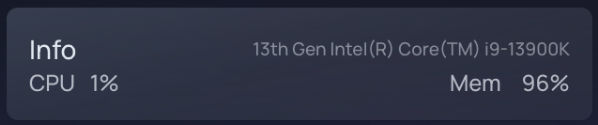
It shows Memory as a %, and I really don’t like that.
If you use memory instead, it looks like this
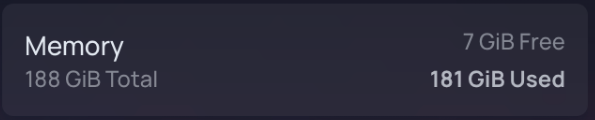
The downside is it takes up an entire widget. That’s not good. My direction is more like this
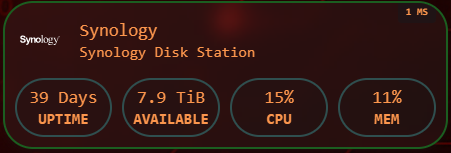
Still undecided…
Probably do pure Glances first.
Problem 3: .env file and declaration in Docker
https://github.com/gethomepage/homepage/discussions/4886 It wasn’t resolved until this issue.
To use env vars in gethomepage, you use "{{VAR}}" not ${} like GPT suggested.
Even the sample file from that senior uses {{VAR}} without quotes
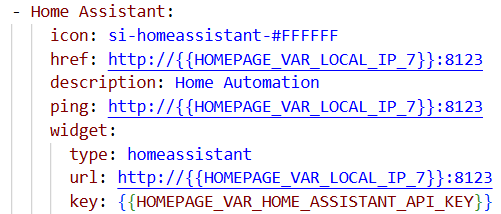
I don’t really get it, but it’s just a syntax error so no need to understand.
Problem 4: Glances and Prometheus
Damn Gethomepage doesn’t support the Glances metrics I want, so I’ll have to find another solution.
Two options. Option 1: fork and add support. Option 2: use Prometheus to query. Probably option 2 because it gives me more Prometheus knowledge.
Problem 5: Port forward and masderaque
Because all node traffic routes through VPN (forced), the system looks quite distributed. So I need port forwards for Prometheus (previously Glances too, but via Cloudflared Tunnel. After a while the limits of Python show up. It slows the system and the web server times out, no data captured => switching to Windows Exporter (for Prometheus) written in Golang, so it runs clean for systems that must run continuously and have no spare resources.
Also, using Prometheus has another benefit: it aggregates data and shows the power of the whole Data Center.
Problem 6: Glances crashes after running for a while
I’m not sure why. Basically both the API and WebUI of Glances stop responding. I guess my system doesn’t have spare resources for this.
So I decided to abandon Glances



Comments
Join the conversation
Leave a comment
No comments yet
Be the first to share your thoughts!