

For a long time, not being able to access LAN while WireGuard VPN is on has always been a painful issue for me. I tried a bunch of ways to fix it. One way was using Cloudflared to forward traffic from a VPS. But that means installing it on the VPS while I’m literally sitting next to the machine. SITTING NEXT TO THE MACHINE AND HAVING IT SEND INTERNET TRAFFIC HALFWAY AROUND THE EARTH AND BACK. It hurts, but I needed it.
Just this noon, while setting up wg-easy, I was totally fed up. I had to learn something new, then run 5 Docker instances like that for 5 public IPs (actually only 4), after opening a ticket with the provider they clarified and reissued. And configuring wg-easy with Docker is basically torture if you have to set up port forwarding for WireGuard. I really don’t want to understand it at all.
The key is: when WireGuard is on, I clicked Master-1 in RDCMan and it connected? But normally you need a forwarded IP to make that work? So I ran:
ping Master-1And it returned a weird IP, an IPv6:
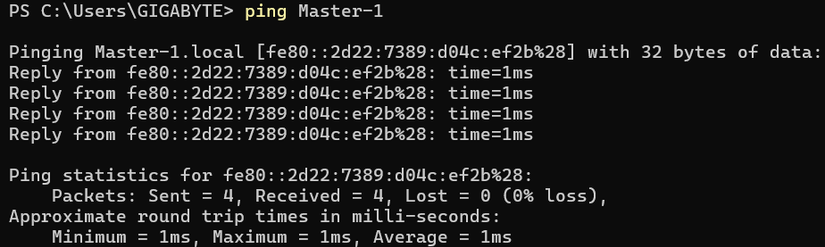
Turns out it’s Link-local IPv6.
What is Link-local IPv6?
Link-local IPv6 is the address range fe80::/10, automatically assigned to every network interface and operating at Layer 2. It always exists, no manual config or DHCP needed, and is used for basic communication between devices on the same network.
Why can Link-local IPv6 pass WireGuard even though it routes 0.0.0.0/0 and ::/0?
Because it runs on Layer 2 and doesn’t have to go out to the Internet. WireGuard operates on Layer 3.
Some troubles along the way
On Windows, for link-local to connect, you must configure the firewall. The issue was: only Master-1 could ICMPv6 ping and RDP in, while Master-2 and others would die if WireGuard was on.
Then I thought: if this can pass, there’s precedent. So why does IPv4 local range get swallowed?
The solution is simple: click a button in WireGuard
Block untunnel traffic (kill-switch)Just don’t enable that tick. AllowedIPs becomes two ranges 0.0.0.0/1 and 128.0.0.0/1 instead of 0.0.0.0/0. I thought they were basically the same, so I didn’t care before. Also I tried unticking once but still couldn’t connect local so I left it. Sometimes I think, if I had known, would I have had to invent all those messy solutions like Docker FORWARD rules just to get LAN connectivity? I even thought about scaling to K8S, but in reality you just need to untick it. Life is funny.
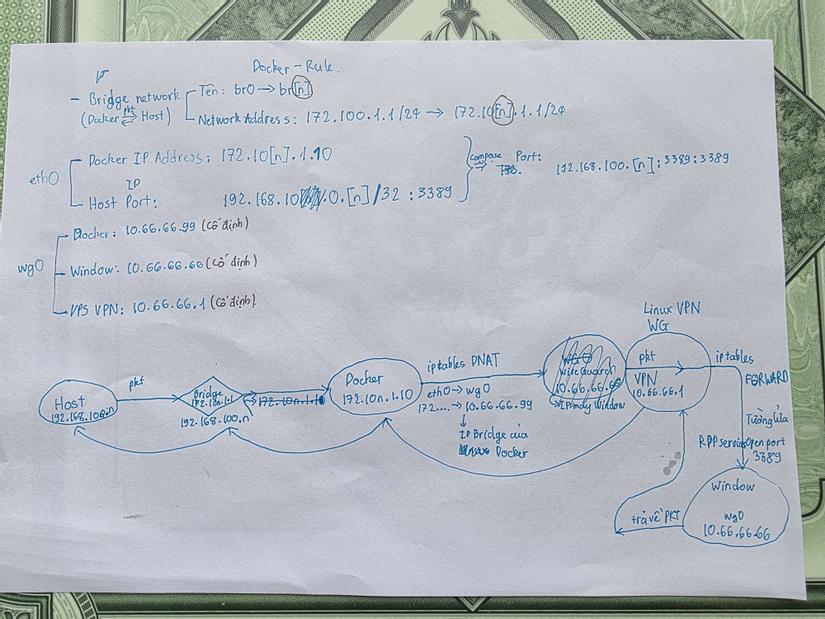
Honestly wild. I’m not the only one either — someone on reddit had the same issue, and his solution was to pick a bunch of IP ranges after selecting half the internet: 0.0.0.0/1 plus a bunch of ranges. He also admitted that if you set 0.0.0.0/0, you can’t access LAN. The solution below says the same thing. So ridiculous. And the Tailscale mesh issue got solved too. I can only laugh.
Looking back, it’s kind of nice. If it was that easy back then, maybe this post wouldn’t exist, I wouldn’t have Docker skills, and maybe no Proxmox either. So, staying positive.



Comments
Join the conversation
Leave a comment
No comments yet
Be the first to share your thoughts!