

A friend on Discord also uses Proxmox, mostly for movies and file sharing. He’s been stuck with a difficult issue for days. So I decided to reproduce the situation and see how to fix it.
1. Privileged vs Unprivileged Container
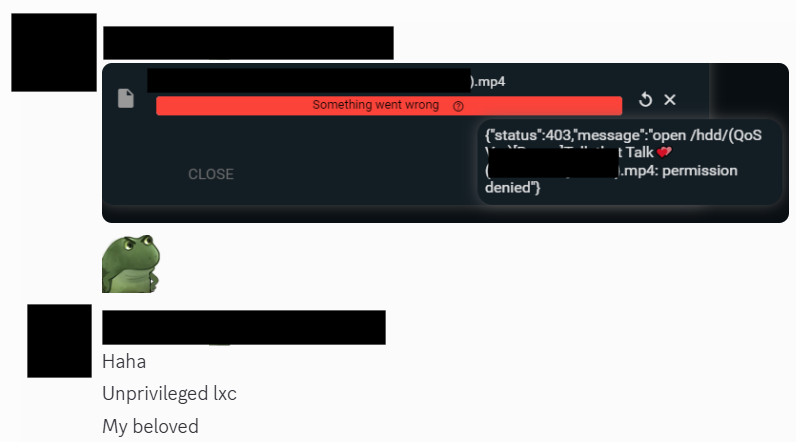
This 403 error in File Browser is because he mounted a hard drive and then had no permission

Mounting the same disk into LXC will always show nobody nogroup like this.
So the solution. He chose fully Privileged

My approach keeps Unprivileged on LXC. I just go into the PVE host and add permissions like this
mkdir -p /mnt/hdd500/data
chown root:root /mnt/hdd500/data
chmod 777 /mnt/hdd500/data   # Yep, leave it 777
Theoretically this isn’t great because everyone has access; if someone gets in, this disk is basically toast.
So I
chmod 755 /mnt/hdd500/data
Bring it back to this
The right solution is to use Unprivileged UID/GID mapping
chown -R 100000:100000 /mnt/hdd500/data
chmod -R 755 /mnt/hdd500/data
This looks better. Permission and access issues solved
2. Re-setup File Browser
Now remap the disk
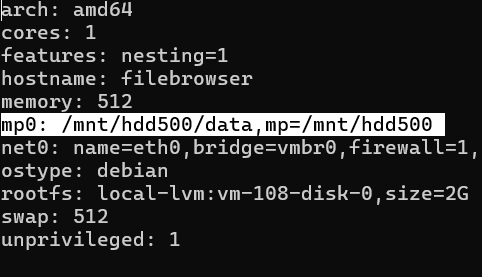
Edit filebrowser.services and add the bold parameter.
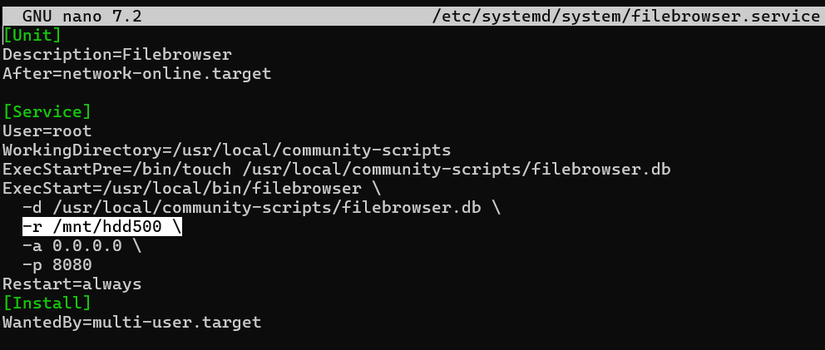
Now it works



Comments
Join the conversation
Leave a comment
No comments yet
Be the first to share your thoughts!